A free retirement calculator turns guesswork into a real number. You enter your age, savings, and monthly contribution, and it shows what your money could grow into by retirement. Most people guess this number badly, either too high or too low, and that gap costs years of missed planning.
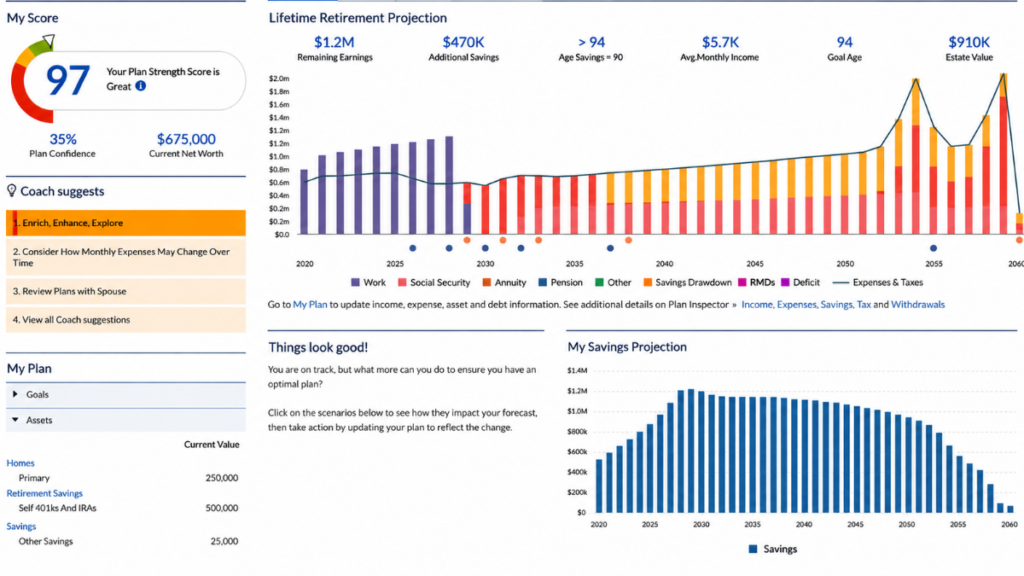
What a Retirement Calculator Actually Shows You
A good calculator does one job well. It takes your current savings, your monthly contribution, an expected return, and your timeline. Then it projects a future balance using compound growth, not simple addition. That single shift, from adding to compounding, is why the number often surprises people.
Most calculators also let you test different scenarios. You can raise your monthly contribution by $100 and watch the ending balance jump. You can push your retirement age back two years and see how much that alone adds. This kind of testing matters more than the first number you see, because it shows you which moves actually move the needle.
A Real Example: What $400 a Month Becomes
Here is what that looks like with real numbers. Save $400 a month starting at age 30, earn a 7% average annual return, and by 65 you will have roughly $720,000 waiting for you. That number comes entirely from consistency and time, not from a large starting balance. Wait until 40 to start the same $400 monthly habit, and the total drops to around $340,000, even though you contributed for the same 35… actually 25 fewer years. The ten-year delay costs far more than ten years of contributions, because you lose the decade where compounding does the most work.
This is the exact kind of projection a free retirement calculator is built to show you. Change the starting age, run it again, and you can see that cost in dollars instead of theory.
The 2026 Retirement Contribution Limits You Should Know
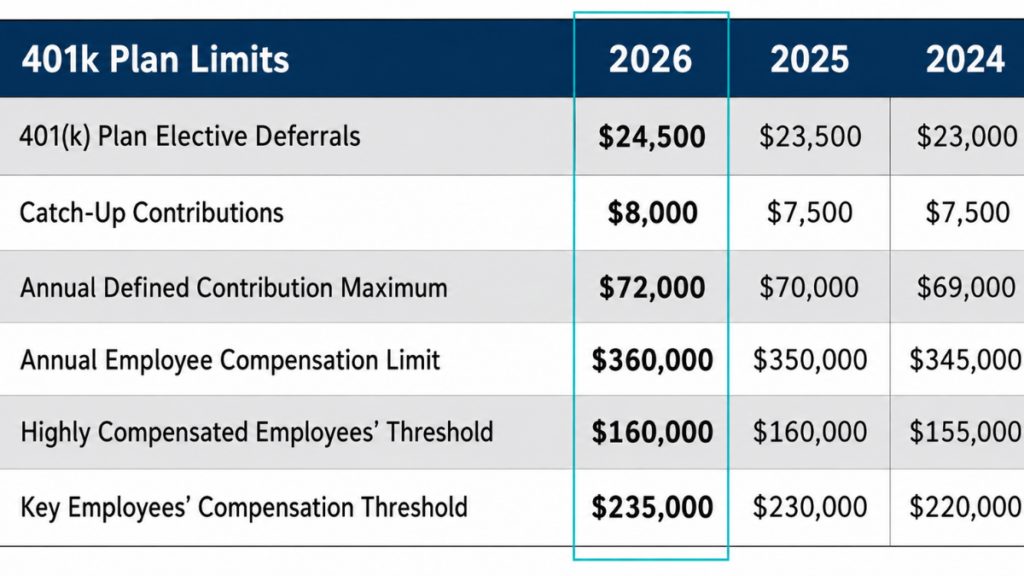
Your calculator’s usefulness depends on how much you can actually contribute, and those limits changed for 2026. The IRS raised the 401(k) employee contribution limit to $24,500 for 2026, up from $23,500 the year before. Workers 50 and older can add a $8,000 catch-up contribution, and those aged 60 to 63 get a higher catch-up of $11,250 instead. These increases came from the IRS’s annual cost-of-living adjustment process, which the Internal Revenue Service confirmed applies under a SECURE 2.0 provision. Fidelity
IRA limits moved too. The 2026 IRA contribution limit is $7,500 for people under 50, with a $1,100 catch-up for those 50 and older, bringing their total to $8,600. This limit covers traditional and Roth IRAs combined, not each account separately. If you max out a 401(k) and an IRA in the same year, plug both totals into your calculator so the projection reflects what you can realistically save, not a rounded guess.
Common Mistakes That Skew Your Number
Most people make the same three errors when they run a retirement calculator. First, they use their gross income instead of what they actually save each month, which inflates the projection. Second, they pick an unrealistic return rate, often 10% or higher, based on a single strong market year rather than a long-term average. Third, they forget to adjust for inflation, so the final number looks bigger than what it will actually buy in 30 years.
Here is the mistake most articles skip entirely: people rarely update their calculator after a raise. A $5,000 salary increase should turn into a higher monthly contribution, not just a bigger number in your checking account. Run your numbers again every time your income changes, not just once a year. That single habit closes more of the retirement gap than chasing a higher return rate ever will.
Social Security and Your Calculator Number
Most free retirement calculators focus on personal savings and leave out Social Security entirely. That is usually the right default, since benefits depend on your full earnings history and the age you claim. But it means the number your calculator shows is your personal savings target, not your full retirement income. Check your estimated benefit through the Social Security Administration’s own statement tool, and treat your calculator’s number as the part you need to build yourself.
How to Use the Calculator With Your Full Financial Picture
A retirement number means little in isolation. Before you trust the projection, get a clear picture of your monthly surplus by running your income and expenses through a budgeting tool first. Once you know what you can realistically set aside each month, that figure becomes the input your retirement projection actually depends on.
It helps to check your starting point too. Calculate your current net worth so you know your real baseline, not just your retirement account balance. From there, you can see how a compound interest calculator applies the same growth math to any other savings goal, from a home down payment to an emergency fund, using the same principles that drive your retirement number.
According to the Consumer Financial Protection Bureau, retirement planning works best when it accounts for a person’s full financial picture rather than a single account in isolation. That means your retirement calculator should be one part of a routine, not a one-time exercise you run and forget. Seeking Alpha
The Number That Actually Matters
A free retirement calculator will not predict your exact future, but it gives you something more useful: a target you can act on today. The gap between $400 a month starting at 30 versus 40 is not a rounding error. It is hundreds of thousands of dollars, decided by a single decision you can make right now. Run your numbers, adjust for the 2026 contribution limits, and treat the result as a plan, not a prediction.